

One of the biggest problems I faced in August was my ongoing issues with GetResponse. They have failed to deliver my weekly newsletter correctly since 21 July. Today was the sixth week that they have failed to send my newsletter.
My weekly newsletter always sends a few hundred additional unique visits and thousands more page views. Since no newsletters were sent in August, page impressions for this blog was thousands of impressions lower than what it should have been. Which in turn means less social media shares and less affiliate income being generated.
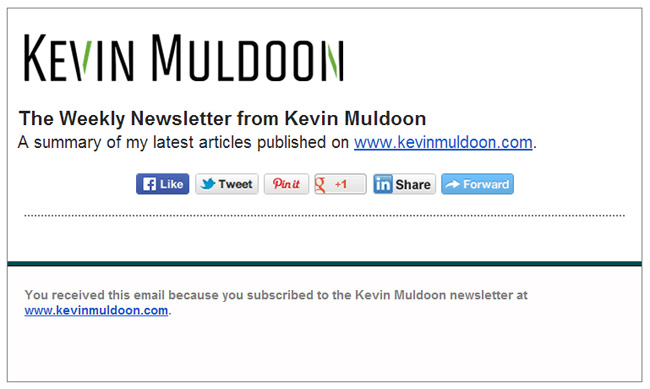
I have did my utmost to be patient with GetResponse; though the whole thing has been tiring. Emails have been going back and forth to try and resolve this. I have had to send them attachments with source code and screenshots to help them investigate it. Every week I was assured that the issue was resolved and every week a blank email was sent out.
They asked me today to send the source code of my latest email newsletter, but I am reluctant to spend more time debugging everything for them since they are not taking this issue seriously. If they had taken it seriously, the first thing they would have done is subscribe to my newsletter so that they can see first hand what is being delivered. They have yet to do this.

Today was the first day they sent out a newsletter email that was not blank. However, the newsletter did not show any images and instead of showing 15 of my latest articles, it only showed one. Their apologies and false promises are falling on deaf ears now as I have been burned by them not delivering too many times. Until the company gets their ship in order, I would strongly recommend staying away from GetResponse.
Available RSS to Email Solutions
One of the reasons I have not moved to another email provider so far is that there are few real alternatives. There are lots of good self-hosted and hosted email marketing solutions; however there is actually very few who offer an RSS to Email tool for sending newsletters.
I have yet to find any self-hosted email marketing solution that supports RSS to Email. Hosted email marketing services that offer RSS to Email include MailChimp, Aweber, MadMimi, FeedBlitz, and Campaign Monitor.
- MailChimp – Appear to be a viable option, however they do not have a good reputation among affiliate marketers due to their strict policies on affiliate marketing
- Aweber – A reliable and well respected email marketing service, however their RSS newsletters look awful
- MadMimi – Cheaper than alternatives, but their RSS to Email tool does not support excerpts (i.e. only full blog posts can be displayed)
- FeedBlitz – Probably the best RSS to Email tool on offer, but their normal email marketing functionality is very poor and their interface is not user friendly
- Campaign Monitor – Their RSS to Email tool looks good, but at twice the price of all other options, they are an expensive choice
GetResponse always seemed like the best solution to me in the past as their RSS to Email tool looked good and they were fairly priced. But their buggy service is a reminder that style should not be chosen over substance. As you can see, none of the options above are perfect.
I have used all of the services above except Campaign Monitor. I stopped using each one as there was something I was not happy about, though I need to realise that they all have their pros and cons and no service is perfect.
Is RSS to Email the Right Solution for Me?
The difficulty in finding a good RSS to Email solution is making me wonder whether I should use the one solution for handling a weekly newsletter and sending out one off emails. Perhaps I need to consider using a service such as FeedBlitz for newsletters and sending out custom email blasts myself using a self-hosted solution. It is not ideal, but neither is sending out poorly designed newsletters either.
Alternatively, I could pony up some extra cash and try out Campaign Monitor, despite them not appearing to offer anything that rival services do not offer at half the price. MailChimp always seems like such an attractive option as there are so many WordPress plugins available for it that help you integrate the plugin. I initially left them because of my concerns over the way they treat bloggers and affiliate marketers and those concerns are still there.
Maybe I should forget about sending out newsletters automatically to email subscribers. Perhaps I should just let visitors subscribe to email updates via a service such as FeedBurner or Jetpack Subscriptions. The problem with the latter solution is that the service does not provide you with any information about subscribers; therefore they cannot be exported. I believe FeedBlitz is a more practical option than Feedburner and Jetpack since you have full control over users.
What Say You?
More research and testing is required on my part before I move away from GetResponse. A part of me wanted to move away from GetResponse weeks ago, though any decision would have been made rushed. It is important that I take the time to evaluate all my options and look at what the best option for the next few years.
I would love to hear from all of you on this issue. What solution are you all using to deliver blog post updates to subscribers via email? Please share your setup in the comment area below.
Thanks for reading.
Kevin
Thanks David. I would be happy to chat with him on Skype if he wants a more detailed explanation of how the service works.
Tim Ferriss just asked on his LinkedIn profile if someone has had experience with GetReponse and Real Magnet. I made him aware of this article. Maybe he will find help in your experiences.
Couldn’t be happier Kevin.
Really like the list it creates from RSS.
And the fact you can schedule it to go out every few days is great because it sends a small list.
MC only allows weekly or daily.
You can use 2500 with Mad Mimi and 2000 with MC for free! hahaha
Hi Brad,
I would have to set my RSS feed to excerpts. That means that those who subscribe to my blog via RSS readers would be unable to read my articles through RSS readers.
Mad Mimi is a nice little service. It’s very user friendly and as you rightly say, it’s half the price.
I don’t believe I have too many people reading my blog through RSS feed anymore; so perhaps it is something to consider. Though I would be disappointing some people by removing the full feed.
Have you found anything lacking in the service? Is there something they need to improve?
Kevin
Mad Mimi – Cheaper than alternatives, but their RSS to Email tool does not support excerpts (i.e. only full blog posts can be displayed)
Are you sure because it does when i use it if you have set your WordPress settings to excerpt.
Very impressed with Mad Mimi and better than Aweber in my opinion at half the price.
Thanks Kevin Muldoon for your reply… I will look forward to this technique and if possible I will share too.
Thanks Brian. I am keen to move back to MailChimp now. I’ll be following your article and backing up everything on a daily basis to dropbox.
I read the article you referenced about affiliate marketing on MailChimp. It still seems a little vague to me as to what they ban and what they do not. Not sure if one hand is trying to keep themselves safe from a legal point of view and the other is trying to appease potential customers from a marketing point of view.
I have yet to find a self-hosted solution for providing weekly newsletters to an email list. I’d love to find one as I would prefer to have more control over the issue.
Hi Kevin,
I agreed with your points about email marketing solutions. Also I want to know one more thing that is it possible to create a self managed email marketing platform? Is there any way to provide weekly or daily email services from our end directly or without relying on external services?
I came up with my solution after reading your post and getting nervous :) http://okaymarketing.com/automatically-backup-mailchimp-lists/ Going to keep using MailChimp but now I have an automated backup.
Also you should read their official stance updated June 2014. http://kb.mailchimp.com/article/does-mailchimp-ban-affiliate-links
I am not too worried and I don’t think you should be Kevin. Your blog offers amazing information to readers. MailChimp has nothing against bloggers trying to support themselves if some of their posts contain affiliate links.
Yeah I never had any problems myself when I used them, but I have read a lot of scare stories. I’m not a big marketer that emails my followers every day, and 99% of my emails do not include affiliate links, but I do not want to be in a position where someone there deems an email to be unsuitable because it is automatically flagged.
Out of interest, do you use their RSS to Email tool to send out a newsletter to followers?
I doubt you would have any problems with MailChimp considering what you want to do. Yours is a legitimate newsletter after all, and – even though your posts might contain affiliate links – not really what I would call affiliate marketing.
I have been using MailChimp for several years to send update emails to my customers (which often contained affiliate links to integrated software and the like) and never had a problem. Good you made me aware of their strict rules though, which I had not heard of before.