

- What is OptimizePress?
- The Dashboard
- Building a Page With OptimizePress
- The OptimizePress Launch Suite
- OptimizePress 2.0 and Our Need for Real-Time Speed
- WordPress Only
- Loads of Graphics
- OptimizePress 2.0 — What I Love
- What I Hate About OptimizePress 2.0
- OP2 Review – To Sum it up
- OptimizePress Pricing
- OptimizePress 2.0 — Final Thoughts and Alternatives
There’s a few things I hate about OptimizePress, and a few things I love.
I’ll get to that soon, but let me be transparent on the front end.
While it’s the bread butter and sweet brown sugar for some of the best copywriters, digital marketers, and content curators in the game, it’s only one of the many software options used to design landing, sales, membership, squeeze and sales pages.
Does it have some blistering weak spots? Yes. Is it the best copywriting software on the market? Absolutely maybe.
It’s a matter of what you want and what you need. Let’s take a look at the Wordpress theme and plugin, OptimizePress, to see what it is, what it can do, and which wants and needs it delivers on.
What is OptimizePress?
Maybe a better question is, “what can I do with OptimizePress?” I often find myself asking “what can I not do with this software?”
Here’s what OptimizePress can do:
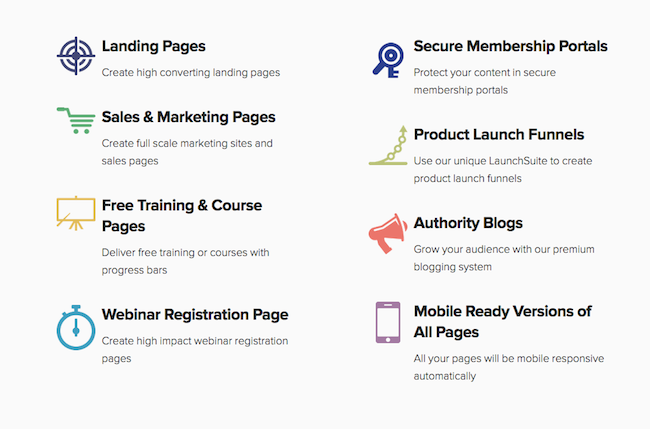
Thanks to a small universe of templates and graphics, OP is an extremely versatile tool for bloggers, copywriters, web designers, affiliate marketers, and many other digital content curators. But ultimately, it’s main function is to convert visitors into customers, prospects, or members.
Firstly, this is designed specifically for WordPress websites, so you install it as a theme or as a plugin. The setup is quick and painless — it’s as simple as uploading the plugin zip or the theme.
Once you’re up and running, this is what you’ll have access to:
The Dashboard
This is where the magic begins. You can set up every page with just about everything you can think of, from your logo and header, to SEO functions and the footer layout.
In the Analytics and Tracking section, you just copy-and-paste your Google Analytics or other tracking code into the box and it’ll start tracking your OP pages.
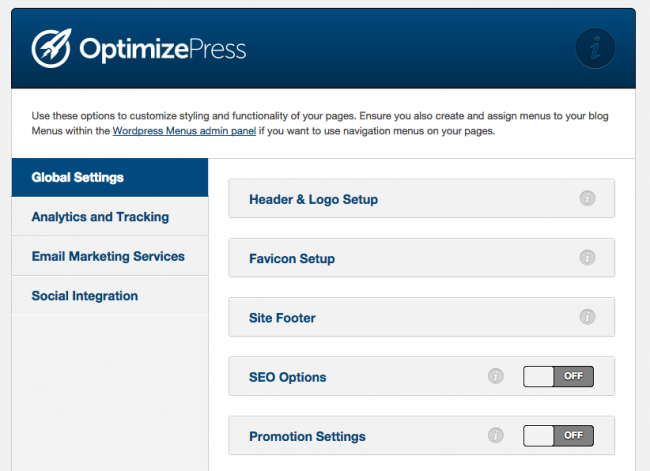
To integrate your auto-responder, you paste your API key to connect, and that’s it. Done deal. OptimizePress currently supports:
- AWeber
- MailChimp
- iContact
- Emma
- InfusionSoft
- GetResponse
- 1ShoppingCart
- OfficeAutopilot
- Ontraport
- GoToWebinar
- CampaignMonitor
Social Integration allows you to… well, integrate your social media.
Building a Page With OptimizePress
Four steps. I love the simplicity of it. You can choose to work from scratch, use a template, or (and this is one of my favorite features) use a page you’ve developed in the past and saved as a preset.
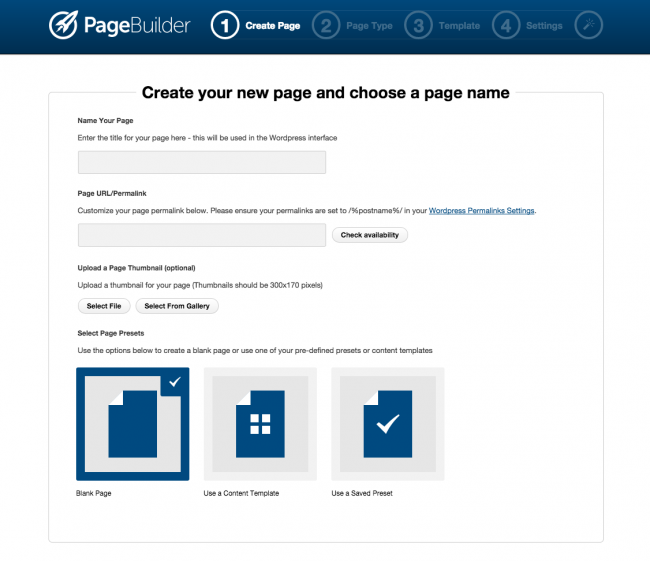
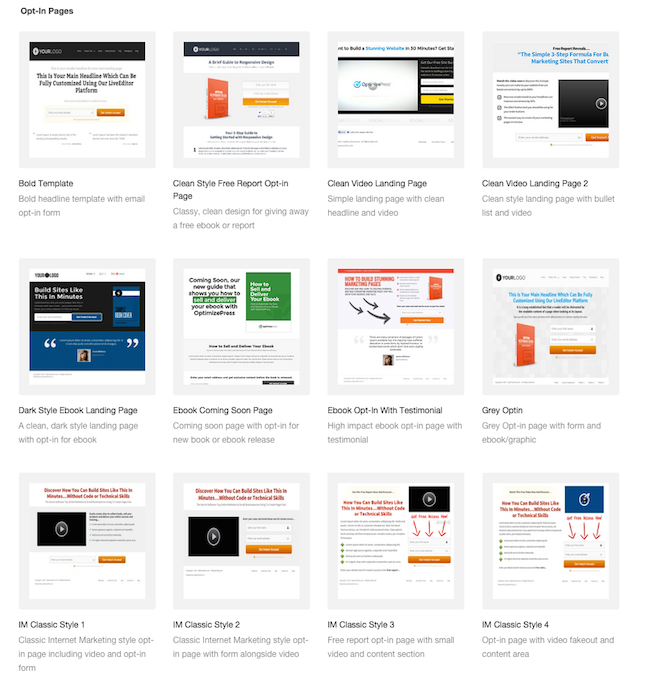
Let’s go ahead and choose from the 30+ templates in the OP collection, which includes:
- Home Page templates
- Membership pages
- Opt-ins
- Sales pages
- Webinar templates
- Squeeze pages
- Ebook pages
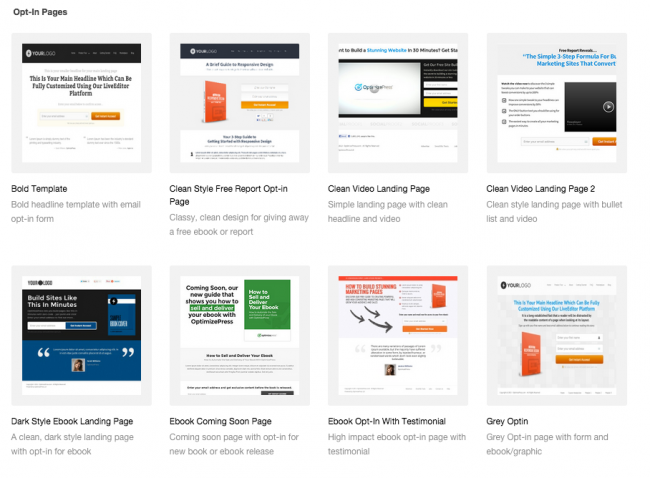
Let’s go with a simple squeeze page. Here’s a nice, clean opt-in.
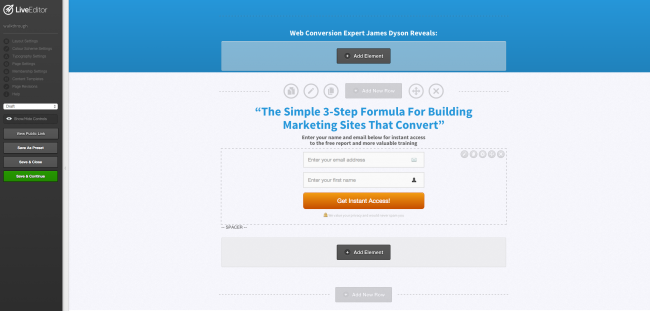
Once you choose a template, you’ll find yourself at the helm of the OptimizePress Live Editor. You may not want to change much, and if you do, it won’t take long. My average squeeze page takes around 15 to 20 minutes, and that includes writing the content, customizing the button (color, text and shape), and also matching the page color to go with the website’s brand. If you want to get fancy (I always do, it’s impossible to resist), explore the endless collection of page building tools — the Elements.
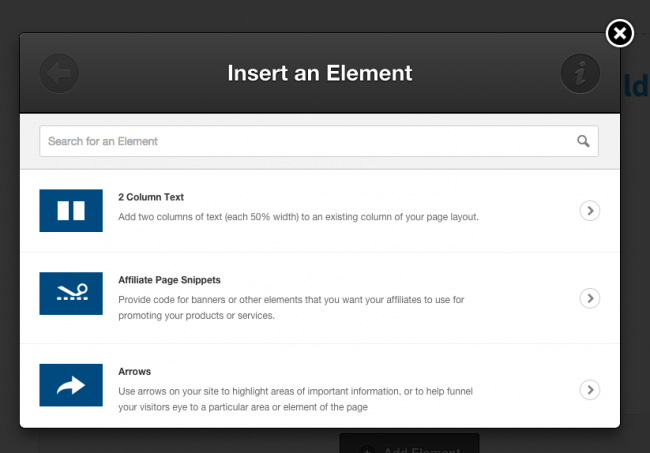
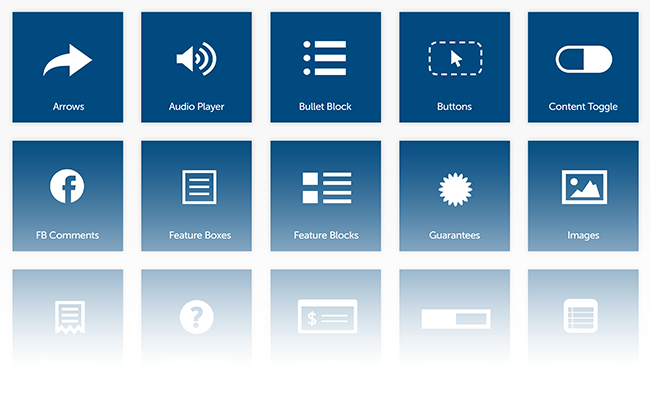
Here’s the full list of the elements and graphics at your disposal:
- 2 Column Text: Add a two column row onto the page to insert text into.
- Affiliate Page Snippets: Provide code for elements you want your affiliates to use while promoting your products or services.
- Arrows: Plug arrows into the page to guide your reader’s eye to important parts of the page.
- Audio Player: Upload Mp3 and other audio files.
- Bullet Block: Keep your content scannable and easy to read with a variety of bullet point options.
- Button: Develop the perfect call to action by creating your own button, or choose from the pre-made button selection.
- Calendar Date & Time: Show the date and time of your event.
- Content Toggle: This is perfect for FAQ’s or information with a title that can be expanded, accordion.
- Course Description Box: It doesn’t actually have to be a course. This feature is useful to describe products and services as well, complete with your choice of icons representing the course, product, or service.
- Custom HTML / Shortcode: Use your own customized HTML shortcode.
- Delayed Content: Delay any element on the page. It’ll show up after the time you set.
- Divider: Some are fancy, others simple — these dividers keep your page organized and professional.
- Dynamic Date: This date always displays the current date, giving old material the impression of super-fresh content.
- Facebook Comments: Give your visitors the chance to leave a comment with their Facebook account.
- Feature Block: Highlight an important section and include a relevant icon.
- Feature Box: Insert text or other elements into a highly customizable feature box.
- Feature Box Creator: This element allows you to create your feature box from scratch.
- Files Download: Give your viewer the ability to download files and file lists.
- Guarantee Box: Instill confidence with a professional guarantee stamp, with your money-back guarantee, terms, or other customer satisfaction promises.
- Headline: Call attention to the topic at hand or a clever one-liner.
- Hyperlink: Insert a highly customizable hyperlink.
- Image with Javascript Alert: Used primarily for video fake-outs or to push traffic through to the optin form.
- Image with Text Aside: An image. With text aside.
- Images: Easy image placement.
- JavaScript: Add your custom JavaScript with this element.
- Launch Navigation: This element is for pages added to a funnel designed in the launch suite. The navigation bar generated will show these pages.
- Live Search: A simple search box with customizable text.
- Navigation: Choose from a variety of navigation blocks.
- News Bar: Highlight the latest news from your site.
- One Time Offer Count Down: Generate a sense of urgency with a count down until the end of sale or offer.
- Optin Box: Quickly plug in a customizable optin box with full auto-responder integration.
- Order Box: Highlight your call to action and order buttons.
- Order Step Graphics: This element shows your customer what step they’re at in the process.
- Pricing Graphics: Use this element to show off and bring attention to a low price.
- Pricing Table: Use these tables to display your pricing and package options in a side by side comparison.
- Progress Bar: Show them the progress they’ve made through the course or training.
- Q&A Elements: Choose from a list of Q&A styles.
- Recent Posts: A list of your recent posts. Perfect for highlighting blog posts on the home page.
- Social Sharing: A slew of social media share icons.
- Step Graphics: Add high-visibility numbered lists or steps.
- Tabs: Accordion style, click-to-expand information.
- Terms & Conditions Box: Another layer of professionalism (and legal protection), this element gives your visitor a set of terms and conditions to agree to before purchase.
- Testimonials: Add social proof to your offer with a variety of testimonial layouts.
- Text Block: Just a simple way to add a normal block of text.
- Tour Elements: A brilliant way to create a call of action button with an additional “take tour” option on the side.
- Vertical Spacing: Add vertical spacing to the layout column.
- Video Player: Take advantage of a sales video or informational video with this element. You can use Embed code from YouTube or a URL.
- Video Thumbnail & Lightbox: Use any image to use as the video thumbnail. When clicked, this thumbnail will pop out into a lightbox video.
- WordPress Comments: Give your visitors the option to add and view WordPress comments.
Once you’ve created the page, chosen or created the template, and utilized the elements above, click “save and publish”, and the page is live!
The OptimizePress Launch Suite
The Launch Suite is where you set up a series of funnel pages, which funnel traffic to your sales or cart page, from stage to stage in the buying process. This allows you to mass change every page in your funnel, without meticulously changing the links for every page.
Now, I’ve given you a pretty solid overview of the software, but there’s still an avalanche of valuable information you’ll want to ingest if you’re interested in using the product.
That was just a simple spin through the world of OptimizePress — with the recent upgrade to OptimizePress 2.0, this tool is sharper and deadlier than ever.
Let’s take a look at:
- The main benefits and upgrades of OptimizePress 2.0
- The things I hate about OptimizePress 2.0
- What I love about OptimizePress 2.0
- Some insider secrets
- OptimizePress 2.0 alternatives
OptimizePress 2.0 and Our Need for Real-Time Speed
In the age of information and lightening speed technology, the tortoise, slow and steady mentality is fully, completely, wholly and irrevocably obsolete.
We need speed, and lots of it. Lucky for us, OptimizePress is designed to cut every middleman and unnecessary corner in professional page development. Here’s how.
The Live Editor
My favorite feature? Real time editing, hands down. I’ve tried just about every landing page software imaginable, and after getting my grubby little digits on real time editing, I’ll never go back. Because I can add copy, graphics, images, arrows, buttons and feature boxes directly to the page in real time, which keeps my copywriting process a smooth flow of uninterrupted creativity.
Pre-Loaded Templates
Speaking of time, the pre-loaded templates slash the time I spend on page creation right in half — at very least. If I’m developing a simple squeeze page for example, it can take mere minutes to pound out a high-converting, professional grade email-nabber, where before OP2 it may have taken hours.
No More Coding
The Achilles heel of my copywriting used to be my chimpanzee coding ability. I really can’t code to save my life. With an intuitive “drag and drop” method, OptimizePress eliminates the need for coding, which means less time spent, and more money in my pockets.
Variety and Compatibility of OptimizePress 2.0
One of the worst things in the world is finding out that your new plugin strong-hands another valuable plugin into a jumbled pile of useless, cluttered computer code. I wish I could say that never happens with OP, but it does. I’ll go into that in more detail soon. Right now let’s focus on the brighter side of compatibility.
WordPress Only
One of the game-changers that OptimizePress willed into existence is an unprecedented level of WordPress compatibility. Every client I have uses WordPress as their platform, and all three of my sites were spawned from WordPress templates. So finding software that integrates seamlessly with WordPress is a no-brainer.
Also, getting clients to let go of the kung fu grip they have on their pre-existing WordPress template is like trying to pull wisdom teeth out of the gaping maw of a pissed off pit-bull. Not fun. The OptimizePress WordPress plugin has made my life substantially easier, client-side and for personal use too.
With the cheapest package, I get to use it on multiple WordPress sites, and even though the right to use it on multiple client sites costs extra, that investment paid itself off (and then some) with the first landing page I developed.
Loads of Graphics
There’s still only one competitor that keeps up with OptimizePress in the graphics department, and that is LeadPages. Minimal options is a deal breaker with most copywriting software, because good copy desperately demands variety. Creating pages with the same graphics over and over again turns your work into a big, ugly cliche.
Can you imagine if Van Gogh painted nothing but The Starry Night? He wouldn’t have a single Wikipedia-entry to his name, because nobody remembers a one-hit wonder. But as you’ve already seen, there’s nothing to worry about in that arena. The OP2 graphics collection is almost absurdly extensive, and even if you find yourself wanting more, you can easily insert your own graphics.
OptimizePress 2.0 — What I Love
- OptimizePress 2.0 is a complete overhaul of the original, which was great to begin with. The most vital upgrade is the clamped down security features, which locks hackers out of your site, guarding it like a leet-squashing kraken.
- The Live Editor lets you make edits directly to the page in real time. Best thing ever.
- Thousands of page manipulation options make this software an incredibly versatile tool.
- Thanks to an astounding collection of Pre-Made templates, you can crank out sales, squeeze, landing, and membership pages out in minutes.
- The ability to create high converting pages with no coding ability is a lifesaver for people who aren’t swimming in thousands of dollars reserved for high quality page design.
- The security software isn’t just heavily armored. It’s updated rigorously and methodically, keeping it bug-free and hacker-proof.
What I Hate About OptimizePress 2.0
- The ClubHouse could use some more work. Compared to the professional-grade quality of the software itself, the ClubHouse has been the gimpy, underdeveloped hind leg of the OptimizePress regime. That said, it continues to improve, and the templates have surged to over 80 in count.
- There’s a learning curve to anything worth pursuing, and OptimizePress 2 is no exception. This can be moderately intimidating for a first-timer.
- It’s fast, but not as fast as LeadPages. It’s a matter of quality over quantity. Variety of graphics and layout produces better quality, but can be more tedious.
- If you want to manipulate the code of your page, don’t even bother. It’s completely locked down to keep black-hat sorts of copywriters from poaching the software.
- Plugin compatibility. Most WordPress plugins play well with the OP 2 plugin, but there’s a handful that don’t. (The Shareholic plugin is one of the most glaring examples.)
OP2 Review – To Sum it up
Here’s something most OptimizePress enthusiasts won’t tell you (mostly because they don’t know). The Live Editor can be mind-numbingly slow if you don’t have the gear to match it. If you’re working with an obsolete computer and don’t know it, you’ll find out quickly with OptimizePress 2, and if you’ve already paid, well, that makes for a pretty crappy day.
Another thing I’d like to throw out there — this isn’t a one-size-fits-all, unicorn-magic piece of software that squeezes out golden eggs of professional sales and landing pages in a 3-minute session of keyboard slapping.
For one, it takes patience and time to learn the initially overwhelming ins and outs, and to straighten the winding rabbit trails of page creation into an efficient, blitzkrieg line of fire, you need to be able to dedicate more than a few fleeting minutes to the cause.
It’s not for everyone. If you don’t have the time to scale the heights of the OptimizePress learning curve, or if you require nothing more than the bare-naked necessities of page development, this may not be the best fit.
There’s a sea of personal preferences that’ll make one piece of software better than another. You have unique and specific needs. So here’s some alternatives to compare to.
OptimizePress Pricing
There has been a trend over the last few years for companies to use complex pricing schemes. For example, the WordPress contact form plugin Gravity Forms has three pricing plans. The cheapest license does not include add ons. Upgrading to their business license means you get basic form add ons and paying more for their developer license will mean you will get access to advanced add ons.
OptimizePress have a fairer pricing system. All three OptimizePress plans offer the following features:
- Real-Time Site Building with LiveEditor
- Includes over 30 Templates
- Comprehensive Element Library
- Membership Security Add-on
- Complete Site-Building Flexibility
- 1 Year of Support & Core Updates
The key difference in their pricing plans is the number of websites you will be using OptimizePress on. This is a much fairer way to price a product as it removes any uncertainty you may have about whether a specific plan has the features you need.
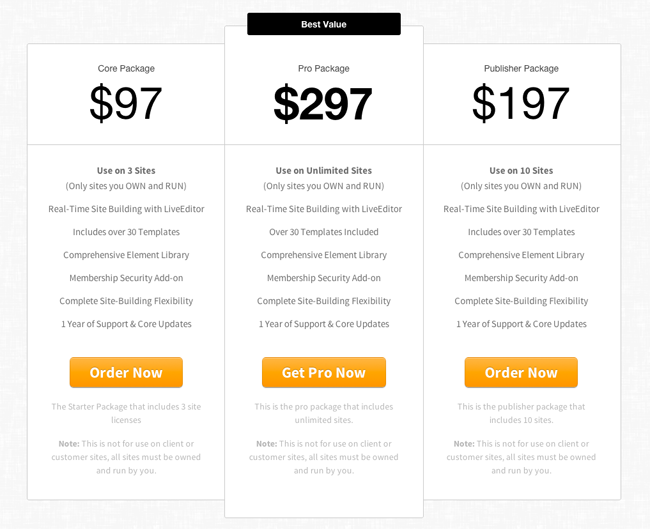
As you can see, the pricing options are straight forward. The core package costs $97 and allows use of OptimizePress on up to three websites. The publisher package at $197 allows use on up to ten websites and the pro package at $297 allows use on an unlimited number of websites. The only restriction is that you must own and run those websites. You are not permitted to add OptimizePress to websites that you are developing for clients.
Support and updates are provided for one year, however renewal prices are only 50% of the original cost if you renew within 60 days of your license expiry date. Don’t worry; if you choose not to review your license, you can still continue to use OptimizePress (you just won’t get updates and support).
OptimizePress 2.0 — Final Thoughts and Alternatives
For now and much of the foreseeable future, LeadPages and OptimizePress are the best options on the market. Like I said earlier, LeadPages is faster. That doesn’t mean much to me because I prefer quality over quantity, and OP 2 is actually pretty durn fast considering the beauty and variety it brings to the word-smithing table. But that doesn’t mean LeadPages isn’t better for you — it depends completely on what you need.
LeadPages is similar to OptimizePress with it’s graphical editing and numerous templates, and while their flexibility fails in a side by side comparison, LeadPage’s bare bones squeeze page templates convert like crazy right out of the box, because they track their users split-testing stats. It’s nothing short of genius. LeadPages templates convert because they provide you with the “survival of the fittest” templates that have an apex-predator track record.
If you’re on a super-tight budget, you’ll appreciate the lightening fast templates from Thrive Themes, and another decent option for the frugal-minded is Hybrid Connect.
But I’ll leave you with this. If you have the money and time, OptimizePress 2 is a solid investment, and LeadPages is right up there with them. It really boils down to personal preference between these two.
I’ve tried numerous free options in the past, and to me, it’s a waste of typing-space to add them here. Even if you’re strapped, with no cash to throw at even the most humble page developing software, it’s better to save up your money than to sink into the cramped quagmire of free squeeze page plugins and landing page builders. It’s a waste of time and effort. There’s an ocean of OP2 and LeadPages tutorials out there, so you can get ahead of the game while you save your money.
When the dust settles, OptimizePress 2 emerges as the victor for me, but that’s only because it fits my unique wants and needs. What’s your copywriting bread and butter?
Has anyone else’s OP live editor stopped working after the most recent update?
Thanks
This thing is driving me crazy, It hungs all the time, every 5 minutes I have to clear cookies stopping my work, support really sucks, I’d stay away of this thing I was you.
I am now totally done with Optimize press. They are incredibly glitchy, and their ‘Live Editor’ is constantly clashing with different plugins, and even some versions of WordPress! Their page builder is so non-intuitive as to be stressful, and their customer service is terrible.
The last straw for me is I cannot update a page that I have changed the Buy it Now link to my ‘money’ product, and have gone through all of their troubleshooting, and it still will not update. This happened on a Saturday night, so I didn’t get customer service until Monday morning when they wrote me asking me a question.
I responded at 6 am PST and didn’t hear from them all day. Come to find out they are on London time, so i now won’t hear from them until tomorrow, and my ‘money’ page will have been down for 2 1/2 days… if they fix the problem tomorrow morning.
They have no phone number to call, and no other way to get hold of them for something urgent… like your money page going down. Plus, unless you want to re-create all of your pages with a new pagebuilder, getting rid of them is dang hard, and you’ll always have to renew because the pages will not work with updated wordpress versions. So, once you use their non-intuitive glitchy page builder and bad customer service, you’ll be stuck with them forever.
Good content guy. Any ideas on how to solve this as you seem to have a great grip on Optimize press please?
I would use OptimizePress over thrivethemes any day! Thrivethemes was nothing but a BIG time waster. (and they will take money out of your bank account without warning – not good.) Go OptimizePress!
Glad you liked the review.
great review sir,thumbs up.if i finally pay for optimize press it would be through your link.
Does OptimizePress include Forum software? IF not, does it work with BBPress?
Not gonna lie brother, this is a very good review. Wow. Hats off to you. Thank you for the help
I cannot personally comment on the software or on the quality of the script, but I will say that paying for updates is common place with software. It helps fund a company so that they can continue to develop and refine a product. Many companies have switched from lifetime updates to yearly updates because of this.
OptimizePress 2 is sincerely horrible to use. The page builder freezes and bugs half of the time, so frustrating to loose 10 minutes of modifications because of that.
What I also find absolutely insulting in the marketing strategies of OP2, it’s the fact that after one year, you have to PAY FOR THE UPDATES! That’s outrageous.
Ok for not getting support, but UPDATES?! Come on… This is basically a hold up: pay or get your website infected when one piece of the bazillion software they use has a major security breach!
I would advise to anybody thinking about buying OP2 to reconsider and run away! OP1 used to be great, OP2 is a rip-off. I believe this is a big “take the money and run” situation for the founders: once OP2 stops to sell, it will be time to retire thanks to the millions they made selling this crap…
I am using OP’s plugin within my Genesis framework childtheme.
Two big issues I have with it:
1. The LiveEditor seems quite flaky, and can freeze
2. Although everybody claims that it can work with YOAST SEO, as far as I can tell YOAST is unable to read any of the landing page content.
Cheers
Jerry
Sorry to hear that Rudi. Support is one of the most important things to have for a product. It is unfortunately also the one thing that it is difficult for reviewers to speak about without using a product extensively.
Now with the new Wordpress 4.31 the membership area is not working anymore; wordpress is creating passwords that are not working; download files for member doesn’t work anymore… because of a special file order that is not installed… And the Help of Optimizepress sucks. Optimizepress is simple BS. With this help desk: Sorry we can’t help you… but you can sell BS!!!!
Man I have spent all day creating a gorgeous page for a client who purchased OP and had a frustrating end. Every time I hit publish the page goes of to Drafts and wont come out to play. It thus isnt showing up on the header as an active Page. The posts are hitting the same problem…When I edit a page and hit update The updated dont show up. I have disabled almost all plugins in vain…totally flummoxed. Any ideas on how to solve this as you seem to have a great grip on Optimize press please?
“…locked down to keep black-hat sorts of copywriters from poaching the software.” FYI a copywriter is someone who writes sales and marketing content. It has nothing to do with “poaching software” :)
Hi Vladimir.
Please post this issue at Rise Forums. We have some members there who use Optimize Press.
Kevin
Thanks for this complete review of OptimizePress. I have been using the theme for my blog for a while, and recently I started to build sales pages.
I have this small problem now: I have added a list like element, for example “Feature Block”. Later I figured out that I want to change the items order within the element, but I can’t figure out how to do it, unless recreate the element from the scratch. Could you, please, help me with this?
Yes, it’s possible with Optimizepress. Just make sure you don’t have a menu on the page, linking the different client pages to each other. And remember, it’s easy to reveal all your clients by a search on Google for “site:landingpage.mydomain.com”. That will result in a list of all your pages on that domain.
Clarank
Thank you for the OptimizePress 2.0 review! I agree that it can be a pain to manage, especially if you have a slow connection or you want to do advanced customisation.
As a developer, I want to easily edit every bit of the HTML that is generated through the design elements that you add on a page. I didn’t find that easy. Also, it loads a lot of CSS and JavaScript files that are just not needed in the page (e.g. Video Player script – you don’t need it on some pages).
At the end of the day, it all comes down to your needs, and some cases LeadPages can be better and vice-versa as with OP you don’t have any recurring payments and you can save some money this way, especially when you’re in the beginning with your business.
Thanks so much! I’m definitely not a coder but want to create landing pages that work for online product/program that involves membership to get access. I put some blood, sweat and tears into memberpress. Now I need an easy way to create landing pages that convert for these programs. I’m starting to like memberpress–and I like that it has a security function to it-people can’t easily listen to the downloads without coming in as a member.
Debating between using leadpages plus memberpress or optimizepress. If I do the OP route, do I need to convert to OP? It wouldn’t be a big deal but I don’t know if OP has the security features of MP. Thoughts? THANK YOU!
What a refreshingly honest, and comprehensive comparison/review! Thanks so much, I’ve been using LeadPages but have grown tired of the ongoing costs considering the fact that I really only use them for lead boxes. I will definitely be checking out OP2.
Erron
Is it possible to setup a website (as an agency) and build landing pages using OP for more than one client. Each client having their own page ?
So, for example:
landingpage.mydomain.com/clientA
landngpage.mydomain.com/clientB