
Before relaunching this blog last week I checked my Google Analytics data for the site. KevinMuldoon.com hadn’t been actively updated for the best part of two years but I knew it still got a little traffic and was curious as to where it was coming from.
The majority of links were from my author bios on other blogs though there were a few random incoming links to my previous blog posts too. I checked out a link to my site from Rawaii Muay Thai – a muay thai camp I went to 3 years ago to train. The page linked to https://www.kevinmuldoon.com/2009/01/12/first-week-in-thailand-at-a-muay-thai-camp/ however that page brought up a 404 error.

The reason this occurred is because I had at one point changed my WordPress permalink structure from day and name (/%year%/%monthnum%/%day%/%postname%/) to post name (/%postname%/). I recall setting up redirects at the time however I probably removed these later when I deactivated my blog and used an HTML template instead.
This obviously affected all posts that I had published before I changed the permalink structure so I had to look for a solution that changed URLs such as https://www.kevinmuldoon.com/2009/01/12/first-week-in-thailand-at-a-muay-thai-camp/ to https://www.kevinmuldoon.com/first-week-in-thailand-at-a-muay-thai-camp/.
I know that there are WordPress plugins available that redirect incorrect URLs however I prefer to do redirects directly via the .htaccess file. I found a fantastic script from Joost de Valk called the WordPress Permalink Generator that helps you do this.
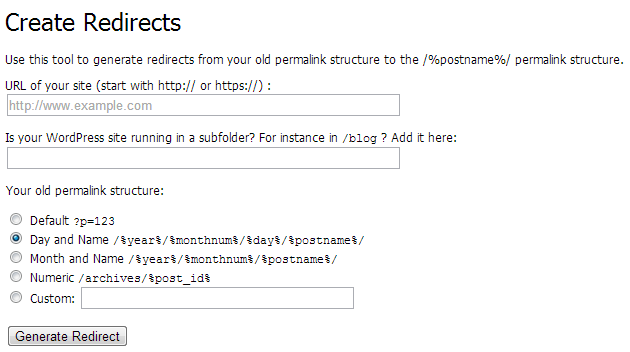
All you have to do is enter the URL of your website and the sub directory it’s installed in. You can choose from the main permalink structures or enter your own custom permalink. The script will then provide you with the code you need to add to your .htaccess file.
Note, you don’t actually need to do redirect the default WprdPress permalink (i.e. Default ?p=123) as WordPress will redirect it for you.
For reference, here’s the code you need to add to your .htaccess file in order to redirect an old WordPress permalink structure to /%postname%/. Simply replace http://www.yourwebsite.com/ with the URL of your WordPress installation e.g. https://www.kevinmuldoon.com/, https://www.kevinmuldoon.com/blog/ or https://www.kevinmuldoon.com/wordpress/.
* I still recommend trying out the WordPress Permalink Generator
Day and Name (/%year%/%monthnum%/%day%/%postname%/)
RedirectMatch 301 ^/([0-9]{4})/([0-9]{2})/([0-9]{2})/(.*)$ http://www.yourwebsite.com/$4
Month and Name (/%year%/%monthnum%/%postname%/)
RedirectMatch 301 ^/([0-9]{4})/([0-9]{2})/(.*)$ http://www.yourwebsite.com/$3
Numeric (/archives/%post_id%)
RedirectMatch 301 ^/archives/(\d+)$ http://www.yourwebsite.com/?p=$1
Make sure you make a backup of your .htaccess file before you make any changes to it so that you can revert to the old version if anything goes wrong. Do not skip this step; one mis-placed character in the .htaccess file will shut down your whole website, so make sure you can overwrite a corrupt .htaccess file with a working version if anything goes wrong.
Hope you found this useful. Kudos to Joost de Valk for creating such a useful little script for free :)
Thanks,
Kevin
You could use a WordPress plugin such as Simple 301 Redirects to help you.
I want to move my domain from /%postname%/ to /%year%/%postname%/, and the yoast wordpress permalink generator is unable to do this for me.
Any help please?
Drop by Rise Forums and explain the problem in more detail and we will do our best to resolve the issue.
Big Problem For Me I m Having Permalink With .html Format but after changing permalink as you mentioned above its working perfectly fine but it still 404 due to postname.html
Glad you found it useful Dan.
Thank you! This is so much better than installing yet another plugin.
Well first I thought the same .. so I disabled it then I noticed that I will get Page not found if I disable the plugin so I enabled it again.
and yes it ads a line in .htaccess file but as I mentioned the plugin itself is still needed. and It adds a 301 Permanent redirect to the new Permalink structure…
I wish I have added the post id before …
again thank you for your great Articles and support :)
Dealing with permalinks can be a real pain sometimes so I’m glad you got it sorted. :)
Thank you very much for the reply … this plugin solved my problem :
http://wordpress.org/plugins/change-permalink-helper/
you should install it before changing your website’s Permalink , then after you installed this plugin try to change your permalink …
the only downside is that this plugin increases the page load time a little bit ( only the redirected pages) but it worth it….
thanks again
Thanks Al. How does it work?
I assume it just adds a redirect to your .htaccess file. Therefore you could copy the code and disable the plugin.
Unless it is doing it through the database someway, which is much less efficient.
Thank you for this great article…
My situation is kind of different , I want to change my permalinks from “/%category%/%post-name%/ ” structure to “/%category%/%post-name%-t%post-id%/ ”
would you please tell me what should I do ?
thank you
You can use the permalink helper to help create the redirect.
It will be something like this:
RedirectMatch 301 ^/([^/]+)/%post-name%/$ http://example.com//%post-name%-t%post-id%/$
Glad you got it sorted :)
@KevinMuldoon , hello, i just changed my post slug. THX.
Have you changed domain or just changed your post slug?
Good morning, I would like a redirection of all links of my permalinks: Nowadays they are: http: // mydomain.com /postname/ and I would like to make: http: // mydomain.com/postname /day/monthnum/year/, please excuse me for my poor Englishman.
Good morning, I would like a redirection of all links of my permalinks: Nowadays they are: http: // mydomain.com / and I would like to make: http: // mydomain/postname /day/monthnum/year/, please excuse me for my poor Englishman.