Archive - May, 2009

Cool Clock Application For iPhone

I don’t own an iPhone. However, I did get the iTouch when it was launched. So I browse the app store from time to time.

The app is called FlipTime and was designed to resemble the boards you see at Airports and Train Stations.

FEATURES:

  • Portrait mode
  • Landscape mode
  • Can flip panels by flicking from top to down or tapping them
  • Can show next/previous month by flicking horizontally
  • Can reset by shaking

Check out the video below to see it in action :

It only costs $0.99 so if you fancy it, you can download the app here and read more about it here.

:)

Windows Vista SP2 Available For Download

Windows Vista

Microsoft have today released the second service pack for Vista. I recommend downloading it if you’re a Vista user as service packs usually fix a lot of the problems that are common in earlier versions of Windows.

Service Pack 2, the latest service pack for both Windows Server 2008 and Windows Vista, supports new types of hardware and emerging hardware standards, includes all of the updates that have been delivered since SP1, and simplifies deployment, for consumers, developers, and IT professionals.

You can download SP2 at the links below. If you have a new laptop and are unsure if your laptop is using a 32 bit of 64 bit version of Vista go to your Control Panel and then click on System. Under the System section you should see a field called System Type, which tells you type of operating system you are running.

Please note, in order to update Vista to SP2, you need to have installed SP1 already. If you have not already done this, you can download Vista SP1 at the links below :

:)

Modern Warfare 2 Trailer

My friend Michael sent me a link to the trailer for Call of Duty 6 AKA Modern Warfare 2. This game is a direct sequal to COD4, a fantastic game which I played to death last year.

It’s set for release on 10th November, just in time for Christmas :)

Link : modernwarfare2.infinityward.com/

It’s strange receiving a package you sent!

Package

At the start of the year I went to Thailand for 3 months to train in Muay Thai. Unfortunately, I got a servere injury (pulled calf) after a month so couldn’t train. But I decided to stay on and enjoy myself.

Because I had went over to train, all of the things I brought were for for Thai Boxing. So I didn’t have many going out clothes, most of my clothing was sporty. Plus I was lugging around my boxing gloves, wraps and shin guards even though I didn’t need them.

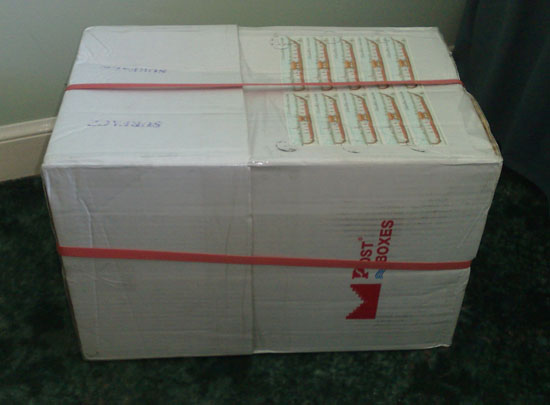
When I got to Bangkok I treated myself to some new t shirts and jeans because it’s so cheap there. So I shipped everything else back to myself and today, 2 months later, it arrived. It’s strange receiving something you wrapped yourself!!


Package

Package From Thailand

Included in the box were 4 pairs of shorts and 6 or 7 training shirts. In the last 2 months I’ve been using the same 3 t shirts for the gym so it will be good to have a variety now! Yes, I could have bought some more but there was no need as I knew this was in transit!

Fancy a game of Puck Man?

Puck Man

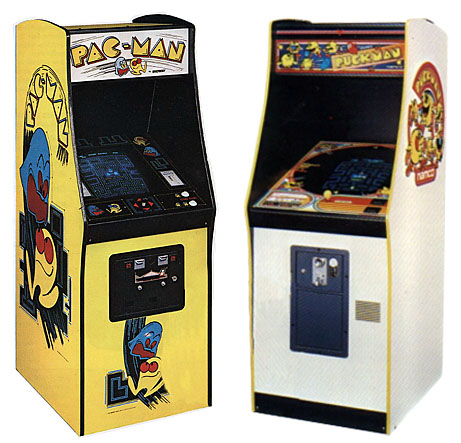
I was bored tonight so was browsing around aimlessly on the net. I came across the wiki page for Pac Man, one of the first games I remember having (for the atari 2600) when I was a kid.

I was surprised to read that the game was originally called Puck Man but Midway changed the name to Pac Man because they were concerned that vandels would scrub out a part of the P and make it look like an F to make Fuck Man (how cool would it be if he was called Fuck Man!!!).

So if you ever come across a Puck Man machine, you now know that it’s probably not a fake. Infact, it’s probably worth a lot of money :)

Puck Man

The Trilogy Meter

It’s suprisingly accurate :)
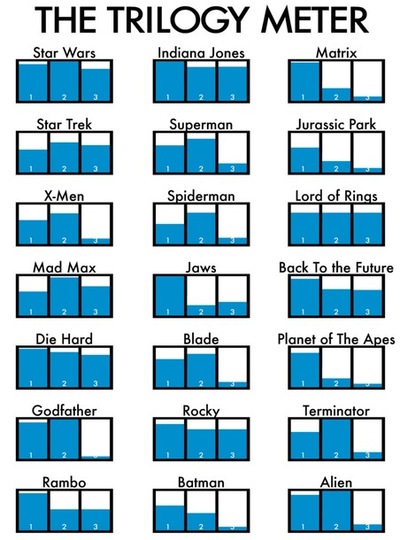
The Trilogy Meter

* Courtesy of Narelle :)

The Trilogy Meter

Accessing Gmail Through Your Mobile Phone

Gmail Mobile Application

The last few days I have spoke about my search to find the best email solution for me. I still have 7 months of my contract to run on my phone so I was looking for a good solution to tide me over til then, at which point I will try and get a good contract with unlimited internet.

At the moment I have a Nokia N95 8GB and although my contract has unlimited texts, it does not have any internet usage included. Through my orange account I can however add bundles to my contract such as Unlimited Evening & Weekend Browsing for £5 per month, 30MB of usage for £8 per month and 80mb of usage for a ridiculous £41.13 per month.

For over a year now I have been forwarding all of my business related emails to my Gmail account. This allows me to check my emails almost anywhere. Before I was using outlook express and had to transfer backed up emails and account details to my other laptop whenever I was travelling, a right pain in the butt!

So my research into ‘how to check my emails on the move’ should really have been ‘how do I check my gmail account on the move’.

Thankfully, with the N95, there are a few options :)

Mobile Gmail With A Browser

Google has a low bandwidth version of Gmail which you can use at m.gmail.com. There are no images or advertisements and the page loads really quickly. A good option to try out.

Nokia Default Mail Client

Nokia symbian phones have a mail client built into them. You can setup a pop mailbox or, more preferable, an imap mailbox.Once you set it up on your phone, you can view, send and receive emails in much the same way as text messages. Infact, the screen looks almost identical.

Google has good instructions on how you can set this up on a Symbian S60 phone :)

  1. Enable IMAP in your Gmail settings.
  2. Select ‘Messaging’ > ‘Options’ > ‘Settings’ > ‘E-mail’ > ‘Mailboxes.’
  3. If you have never set up email on your phone before, select ‘Yes’ to define a new mailbox. If you already have other mailboxes, select ‘Options’ and then ‘New mailbox.’
  4. Select ‘Start’ to begin the setup wizard.
  5. Select ‘IMAP4′ and then ‘Next.’
  6. Enter your full email address (including ‘@gmail.com’) as the email address and select ‘Next.’ Google Apps users, enter your full address in the format ‘username@your_domain.com.’
  7. Enter ‘imap.gmail.com’ as the incoming mail server and select ‘Next.’
  8. Enter ‘smtp.gmail.com’ as the outgoing mail server and select ‘Next.’
  9. Select the appropriate access point and then ‘Next.’
  10. Enter a descriptive name for the email account mailbox name.
  11. Once your mailbox is set up, select it from the email mailbox settings screen.
  12. Select ‘Connection settings’ > ‘Incoming e-mail.’
  13. Enter your address (including ‘@gmail.com’ or ‘@your_domain.com’) and password.
  14. Select ‘SSL/TLS’ for your security (ports) and define your port as ’993.’
  15. Select ‘Back.’
  16. Select ‘Outgoing e-mail.’
  17. Enter your email address (including ‘@gmail.com’ or ‘@your_domain.com’) and password.
  18. Select ‘StartTLS’ for your security (ports) and define your port as ’587.’
  19. Select ‘Back’ and change any other settings according to your preferences.
  20. Check our recommended client settings, and adjust your client’s settings as needed.

All Symbian also provide a good quick guide on how you can do it.

Google Gmail Mobile Application

Gmail Mobile ApplicationGoogle have a range of applications for mobile phone users. All you need to do is go to www.google.com/mobile/, select the type of phone you have and then select Gmail. You then have to enter your phone number (make sure you go to your regional google i.e. for the UK go to www.google.co.uk/mobile/).

After that Google will send you a download link to download the app to your phone.

Which Method Is Best?

I followed Googles Instructions and setup gmail through the default mail client on my Nokia N95 8GB. It works ok but it’s not perfect.

You can setup automatical retrieval so that your phone will check for new mail every 15 mins, 30 mins, hour or day or whatever. You can also set how many new messages you will download. I stupidly asked my phone to receive all mail and my N95 then tried to download every single email that I have on my Gmail. My phone froze and I had to switch off my phone as I couldn’t get it to stop. When I switched it back on I noticed that it had downloaded over 2,000 messages!

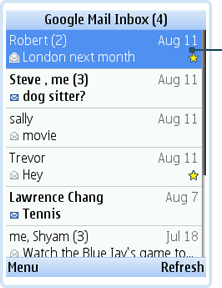
The mobile version of Gmail works pretty well but for me, the Google App was by far the best way to check my emails. It’s a scaled down version of Gmail but it still has all the major features like starring posts, something which the other methods lacked.

All the methods are fairly quick and until I get a new phone contract, I weill probably use a mixture of the default client and the google mail application.

If I’m out and about and want to check my emails I can logon via the Gmail Application. Unless you leave that on constantly though, you will not be informed of new posts. Therefore if for some reason I am out and need to know when I receive an email then I can use the default mail client that Nokia offers. I can set it so that I am informed of any new emails to my account and then I can go and check my email through the Gmail application.

This is the best setup for me and it won’t use much bandwidth either. Plus, I can always try and leech some free wifi if I’m at a friends anyways :)

Hope this helps some Gmail users out there :)

Kevin

50% More Ram Makes A Big Difference

Ram

I decided to do something I’ve been meaning to do for a while now and extend the life of my laptop a little and upgrade it’s RAM. Looking back, I’m not sure why I haven’t upgraded it until now as I have upgraded my last 3 portable laptops (the one I use for travelling) and before that my PC always had the maximum amount of RAM it could hold.

My Asus G1S is about 2 years old now but it was top of the range at the time with it’s 2GB of Ram. It’s still not that slow generally but there are times, when I have several programs on at the same time, that it slows down a little.

I took a look online the other day and noticed that a 2GB module only costs £20.69, which is buttons in the grand scale of things. With 2x 1.1 GB modules already in the laptop, I had the option of either upgrading to 3.1GB for £20.69 or purchasing 2 modules for £41.38 and putting 2 GB modules in.

However, since I have a 32 bit version of Vista, putting 4 GB into my laptop is pointless as it will only recognise between 3 GB and 3.5 GB. This is because vista can only allocate 4GB of RAM memory (roughly 2^32). However, this includes the RAM from your graphics card, sounds card etc too.

How much RAM you actually get from putting 4GB into a 32 bit version of Vista varies from machine to machine. Some people get as much as 3.5 GB but most people get around 3.2 GB. There are some bios workarounds and tricks which you can use to try and get closer to 4 GB but the only sure way to get all of the 4 GB of RAM is to either install a 64 bit operating system i.e. a 64 bit version of Linux or Vista, which isn’t really worth doing as I can’t upgrade for free and would have to buy it outright. It’s simply not worth it with this machine.

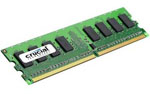
I got the module delivered today (from Crucial) and quickly installed it. Within a few minutes my laptop was booting up with 3.1 GB of Ram. And it has made a big difference. I sometimes have 7 or 8 windows open which is why it got slow at times before but now, with an extra gig to play around with, the laptop handles it very well.

My brothers laptop only had 1 GB installed (2x512MB) so I was able to boost that as well from around 890 MB to 1.4 GB. Due to the memory Vista itself took up, the difference on that laptop was much more apparent. Before FireFox was incredibly slow at loading up but now it loads up quickly (like it should).

DDR2 Ram is really cheap now so I recommend upgrading the RAM on your laptop if it is not at it’s maximum. Don’t be daunted by the thought of upgrading RAM on a laptop, it’s actually very easy. For 99% of laptops it’s just a matter of unscrewing a slot at the bottom and putting your module in :)

Lost Puppy

Lost Puppy

I know you are a dog lover and will help. Our neighbour has lost her Chihuahua puppy and is desperate to find him.

Yesterday, she was sitting on the couch watching TV and realized he was gone. She called out to him and he never responded. She then noticed the back door was open.

She has been putting up signs everywhere in an effort to have him returned.
Thanks for your help.

Lost Puppy

Blackberry Pearl – £179.99 with Unlimited Emails & Internet

Blackberry Pearl

Yesterday I talked about how I have been looking at mobile email solutions. The device I found, the Peek, is unfortunately only available in the United States.

A few days ago though I came across this advertisement for the Blackberry Pearl.

Blackberry Pearl

Whilst the BlackBerry 8110 is not a top of the range phone, it does have push email. You can pick it up sim free for about £130.00 so £179.99 for the phone AND unlimited email and internet is a great offer (particularly on pay as you go). However, this is a great offer only if you don’t use your phone much as you don’t get free minutes or free texts so if you were using it regularly as a phone, I think you’d be better off getting a contract.

I don’t particularly want to carry two phones around with me so this is obviously not the best solution for me.

I have found a good temporary solution which suits me though. I’ll tell you all about it tomorrow :)

Page 1 of 212»